StylzHoldings
SENBONO Men‘s Smart Watch with 1000mAh Large Battery, 60Days+ Standby Time, 100+ Sports Modes, Wireless Calling, Strong LED Flashlight & Compass, 1.46inch HD Display, 360*360 Resolution, USB Rechargeable, Smart Watch for Me
SENBONO Men‘s Smart Watch with 1000mAh Large Battery, 60Days+ Standby Time, 100+ Sports Modes, Wireless Calling, Strong LED Flashlight & Compass, 1.46inch HD Display, 360*360 Resolution, USB Rechargeable, Smart Watch for Me
Couldn't load pickup availability
SPECIFICATIONS
Applicable Age Group: 18 Years+
Battery Capacity (mAh): 1000
Battery Properties: Rechargeable Battery
Body Material: Plastic
Brand: SENBONO
Item ID: WF9117465
Operating System Version: iOS, Android
Operating Voltage: ≤36V
Origin: Guangdong,China
Power Mode: USB Charging
Rechargeable Battery: Lithium Battery-Polymer
Screen Resolution: 360p
Screen Size: 1.46inch
Strap Material: Silicone
Water Resistance Level: IP68
Wireless Property: wireless
Wireless Version: Wireless Version 5.4
Watch languages: Japanese, Korean, English, French, German, Italian, Dutch, Portuguese, Spanish, Polish, Russian, Indonesian
How to Use the SENBONO Smart Watch: 1. Download the app from the App Store. 2. Turn on "Wireless" on both your smartphone and smartwatch. 3. Open the app, go to "Add Device" and select the watch from the list. 4. Follow the in-app prompts to complete the pairing process. Ensure the "Connect" option is checked. 5. Allow "Contact and Call Permissions" when prompted; a pop-up window may appear for confirmation. 6. Turn on Wireless calls, text messages, and app notifications.
Note: 1. If your watch won't connect to your phone, delete the app and re-download it. Reset the watch to factory settings, and then reconnect to your phone for normal use. 2. If your watch won't fully charge after a long period of time, use a power bank to charge it.
Note: This app is not a medical device.Data obtained during the use of this app is for reference only, and should not be used for clinical diagnosis,medical research, diagnostic, or treatment purposes.
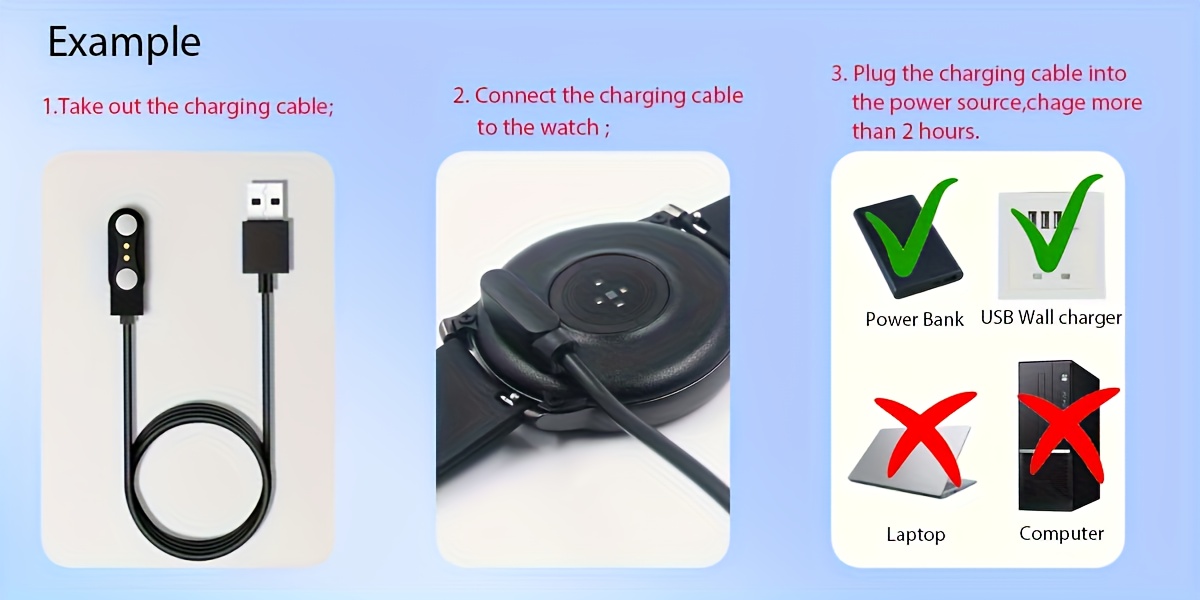
How to charge the watch? 1. Take out the charging cable in the product box; 2. Connect the charging cable to the watch; 3. Plug the charging cable into the power source; 4.Please charge the watch more than 8 hours first time.
Note: Please do not use a computer or laptop to charge the watch, because the voltage of the computer and laptop is too low, and it takes a very long time to charge the watch to have enough energy.
How to set the language and time? Download the APP, and then connect the watch with your phone. The language and time will change the same as your phone. NOTE:Because the watch is set in multiple languages, but because the expressions in multiple languages are not completely consistent, there may be errors in some language translations. This is normal.